Nekuta Module
The optional @devtools/nekuta-plugin adapter exposes Nekuta stores through the
Nekuta Stores custom inspector. It reads the library's store registry and
applies edits through $patch; it does not mutate React Fibers. The generic
React Components view remains read-only.
Try The Verified Playground
From this repository's root:
npm install
npm run build
npm run start:dev --workspace @devtools/vite-playground
Open the Vite URL printed by the server (normally http://localhost:9020/).
The Nekuta store fixtures section contains a counter and a todo store.
Open the floating React DevTools panel, dock it to the bottom for more room,
and select Nekuta Stores. If a crowded tab bar interferes with pointer
selection, focus the Nekuta tab with the keyboard and press Enter.
Use the embedded overlay for this walkthrough. Its same-origin iframe can access the application's plugin bridge; an independently opened standalone client does not automatically share that registry. Browser-extension delivery is not covered by this verified Nekuta path.
Connect Your Own Stores
The adapter requires @nekuta/core version >=0.1.0. The repository uses the
0.1.x API. Add the adapter to an application that already uses Nekuta:
npm install -D @devtools/nekuta-plugin
Use the Vite delivery guide to load the panel. Create your stores against the same Nekuta instance passed to registration:
import { createNekuta, defineStore } from '@nekuta/core';
import { registerNekutaDevTools } from '@devtools/nekuta-plugin';

export const nekuta = createNekuta();
export const useCounterStore = defineStore({
    id: 'counter',
    state: () => ({ count: 0 }),
    getters: {
        doubled(state) {
            return state.count * 2;
        }
    },
    actions: {
        increment() {
            this.count += 1;
        }
    }
});

// Create an instance so it exists in the inspector tree.
useCounterStore(nekuta);

export function registerCounterDevTools() {
    registerNekutaDevTools({ nekuta });
}
Call registerCounterDevTools() once from your development browser entry or
integration setup. Use your existing Nekuta provider and subscriptions for the
application's React views; defining a store alone does not mount or subscribe a
React component. Keep the adapter and registration out of production bundles.
Registration needs an app-side plugin context. The current Vite playground
supplies this in DevToolsPluginContext after mount. Loading the overlay alone
does not initialize that context in the inspected application's module registry.
When adapting the repository setup, reuse the following bootstrap in a
development-only effect after React mounts, unless your host already provides it:
import {
    createDevToolsContext,
    registerDevToolsPluginContext
} from '@devtools/kit';

export function initializeApplicationPluginContext() {
    registerDevToolsPluginContext({
        context: createDevToolsContext({ shouldBridgeHookEvents: false }),
        hasRoot: true
    });
}
This is the current internal host bootstrap, not a Nekuta option or a public
plugin-author API. @devtools/kit is a private workspace package; the repository
playground is the reproducible setup when that package is unavailable to an
external application. Registration made before initialization is buffered and
flushed when a context and root become available. Do not repeatedly replace an
existing context or register from a component render function.
The current Vite plugin serves the overlay stylesheet but does not automatically link it into the app page. The playground adds this link through a development-only Vite HTML transform:
<link
    rel="stylesheet"
    href="/__react-devtools-overlay__/devtools-overlay.css"
/>
Use the corresponding served overlay path when configuring a different Vite
base or overlayBasePath, and keep the link out of production HTML. Without the stylesheet, docking and iframe sizing
can be incorrect even though store requests work.
Registration Options
| Option | Default | Behavior |
|---|---|---|
nekuta | getActiveNekuta() | Use an explicit application instance to avoid inspecting a different active instance. No active instance produces an empty tree. |
id | nekuta | Plugin registration ID. The registry deduplicates it; the first installation wins. |
label | Nekuta | Plugin descriptor label. It does not rename the Nekuta Stores inspector. |
Inspector ID nekuta-stores and timeline layer ID nekuta-actions are fixed.
Changing the plugin ID does not create isolated inspectors for several Nekuta
instances. There is currently no public unregister function; reload the page
after changing the registered instance or setup.
Browse The Store Tree
The tree lists instantiated stores by $id, not every store definition in your
source files. Each node has a store tag. Tree filter matches store IDs
case-insensitively; type todos in the playground to show only vite-todos.
Clear the filter to restore both nodes and select vite-counter.
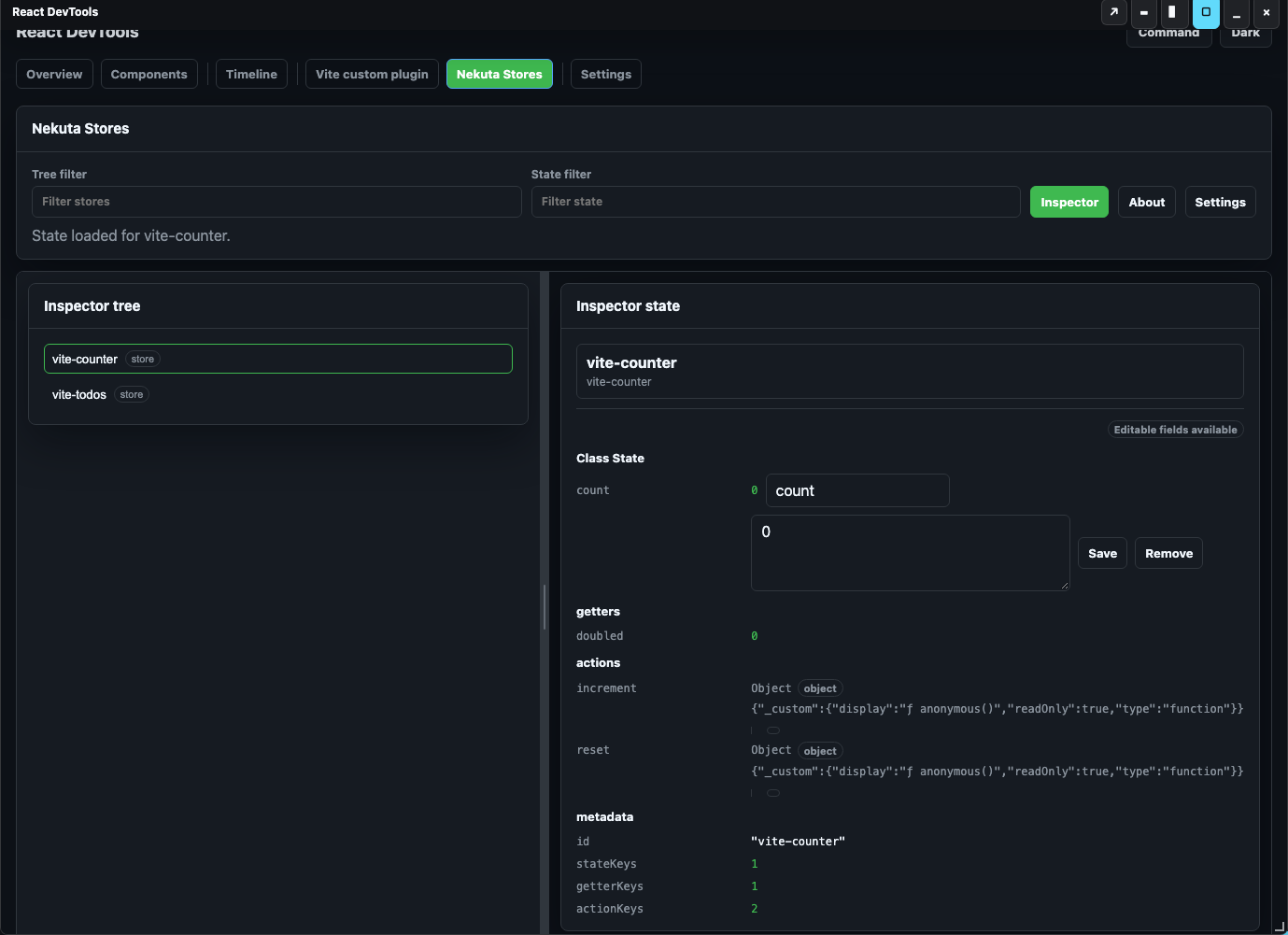
Node metadata contains action count and state keys. It does not currently include subscription counts, store kind, or source files.
Read The State Groups
| Group | Contents | Editable |
|---|---|---|
state | Entries from $state, formatted for display. The current viewer labels this group Class State. | Yes, at the top-level entry. |
getters | Non-function fields outside $state, excluding $-prefixed keys. | No. |
actions | Function fields excluding $-prefixed keys; displays function metadata rather than running them. | No. |
metadata | Store ID and counts of state, getter, and action keys. | No. |
error | An unknown-store diagnostic if a selected ID no longer exists. | No. |
Empty state/getter/action groups are omitted. Values use the core display formatter, so function, circular, or complex values can appear as diagnostic objects rather than original runtime values. Do not assume such representations are safe to write back into the store.
Select vite-todos to inspect its items array and nextId, with derived
openCount and action metadata for addTodo/toggleTodo.
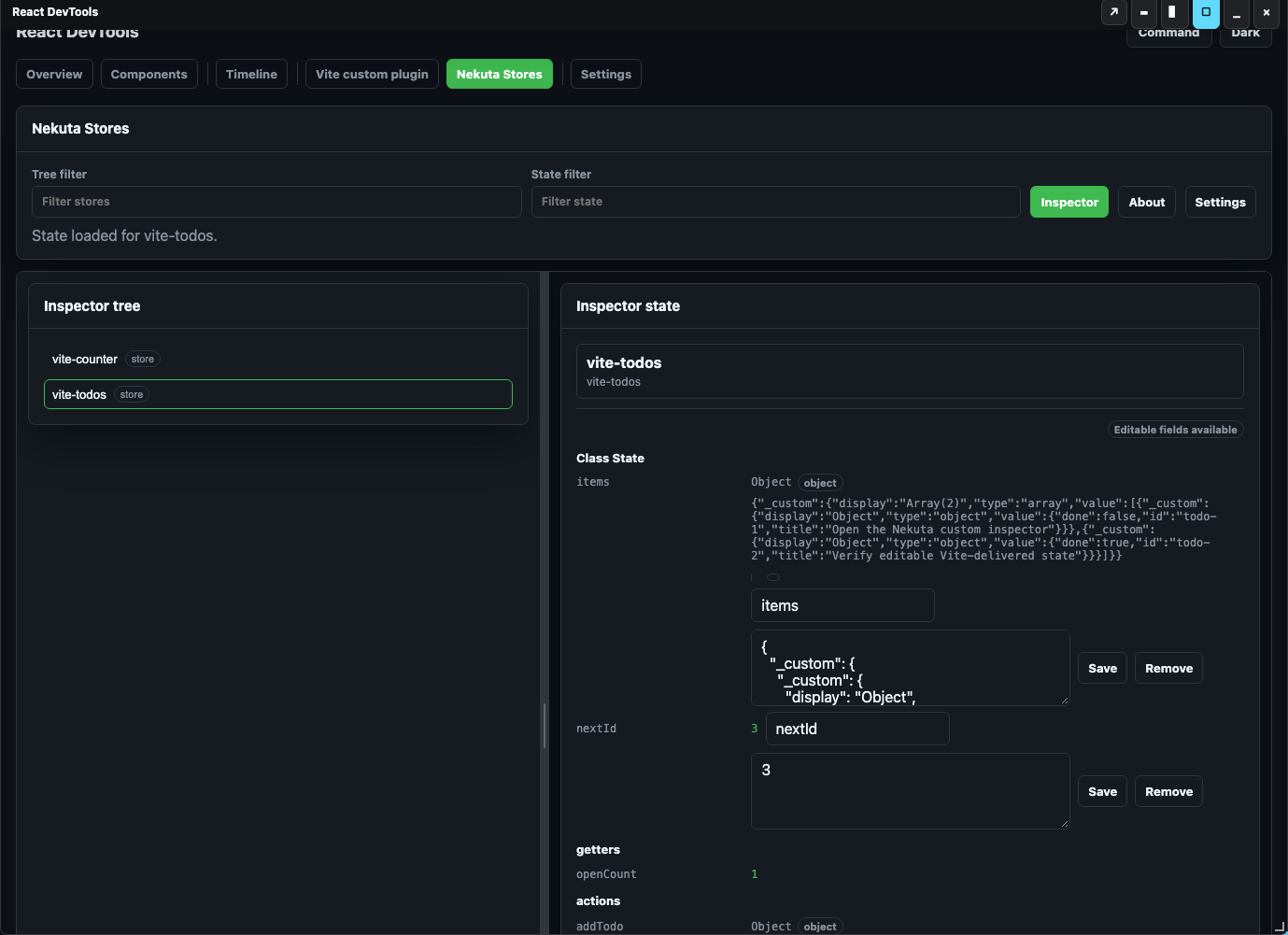
The State filter filters the displayed snapshot. Clear it before editing:
edit paths use entry indexes, and filtered indexes can differ from $state key
indexes. Selection requests read current library state; the inspector does not
continuously subscribe or poll every store mutation. Select another store and
then return to refresh after an application-side action.
Edit State And Verify The Application
Use a disposable development store for this walkthrough:
- Select
vite-counterwith both filters cleared. Itscountstarts at0. - Leave the key input as
count, enter7in the value input, and choose Save. The status should become Updated count. - Check the application's Nekuta counter store: Count: 7 and Doubled: 14 confirm that this was a library mutation, not just a panel edit.
- Select
vite-todos, then return tovite-counter. Confirm the refreshed snapshot containscount: 7anddoubled: 14. - In the app, choose Increment, then Reset, to confirm its normal actions still work. Reselect the counter to refresh the inspector snapshot.
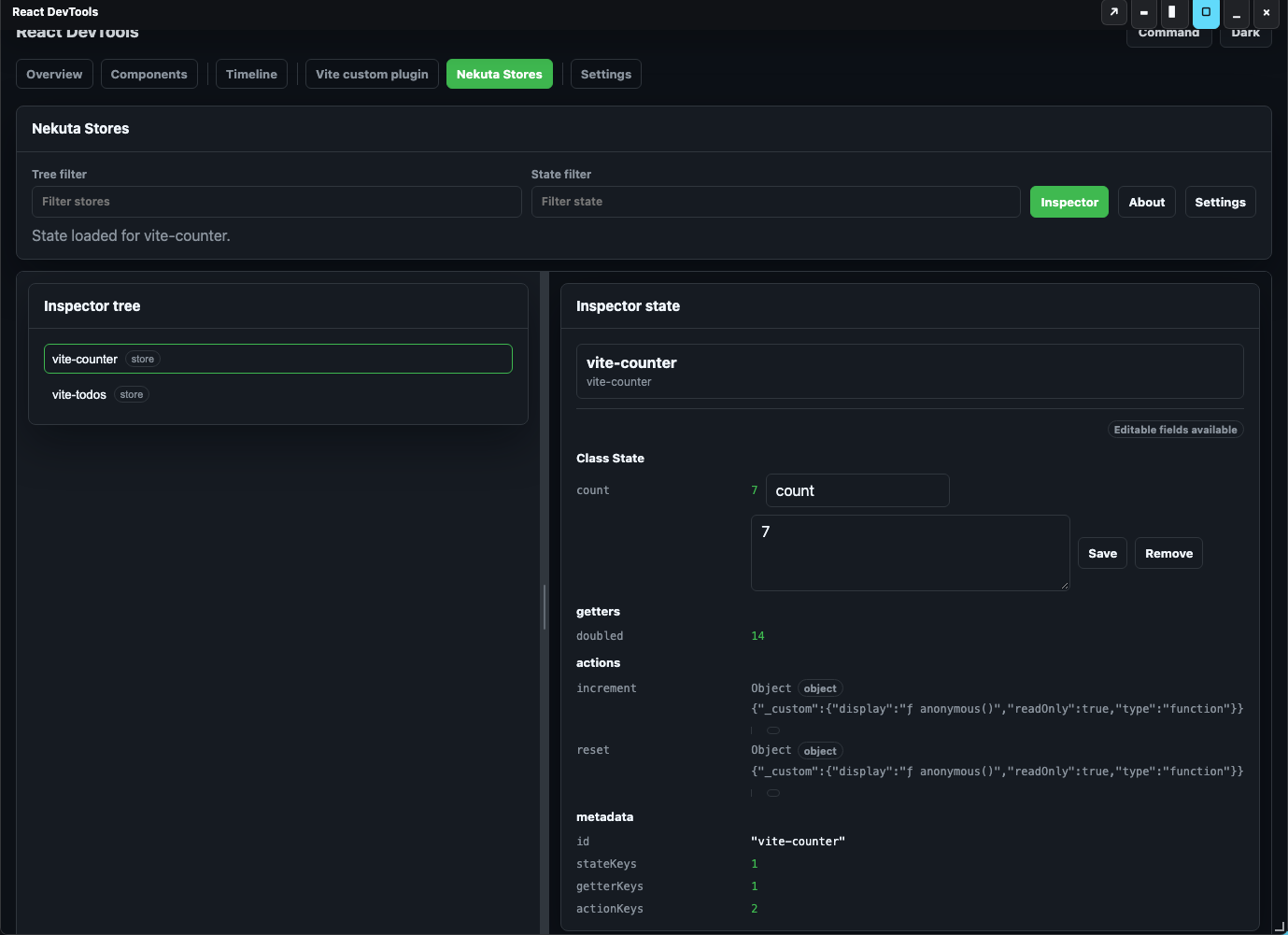

The adapter resolves an edit path such as ['state', 0, 'value'] against the
selected store's $state keys, writes through $patch, emits a new state
snapshot, and records a State edited event on nekuta-actions. The current
client updates the edited field locally after Save; derived values may remain
stale until you reselect the store. Emitting a snapshot is not a guarantee that
every client view has subscribed to that emission.
Rename, Remove, And Value Limits
Changing the key input and saving requests a rename; Remove requests deletion.
The adapter implements both with a $patch callback. These change the store's
schema and can break getters/actions that expect the old key. The adapter does
not prevent conflicting rename targets or validate application-specific value
types. Use disposable stores, inspect the resulting application, and reload to
restore this playground's initial state; there is no adapter undo stack.
The UI coerces values based on the displayed field type. Numeric fields accept numeric edits; string/boolean/collection behavior follows the state viewer's conversion rules. Editing an array/object replaces its top-level value; arbitrary nested-path mutations are not a supported Nekuta edit contract. Formatted values and invalid input can be lossy. Getters, actions, and metadata remain read-only.
What This Integration Does Not Yet Show
The adapter currently depends on Nekuta's private _s registry. It does not
provide query/module trees separate from stores, subscription counts, automatic
capture of every action or async transition, an action execution UI, source-file
navigation, multi-instance isolation, or an undo history. It emits successful
inspector edits to the timeline API; that does not establish complete timeline
rendering or action recording in every delivery mode.
Troubleshooting
| Symptom | Checks And Recovery |
|---|---|
| Nekuta tab is absent | Confirm development registration ran and the app-side context initialized. Use the embedded same-origin overlay. Reload after changing registration; duplicate IDs keep the first setup. |
| Tree is empty | Confirm a Nekuta instance is active or explicitly passed, stores were instantiated against it, and the tree filter is clear. Definitions alone do not create registry entries. |
| Wrong stores appear | Pass the application's explicit nekuta instance instead of relying on the global active instance. Reload after changing it. |
| State/getter is stale | Select a different store and return. The panel reads snapshots on selection rather than subscribing to all library changes. |
| Save changes the wrong entry | Clear state filters before editing because edit paths are indexed against $state keys. Reload disposable fixtures after an unintended write. |
| Save reports an error | Check the selected store still exists and the edit targets a top-level writable state entry. Unknown stores, unsupported groups/indexes/fields, or library patch failures can reject edits. |
| Application does not rerender | Verify the actual store instance and the application's Nekuta subscriptions/provider. A panel snapshot alone does not prove the React view subscribed to store patches. |
| Panel is narrow, misplaced, or tabs overlap | Load the served overlay stylesheet, dock to the bottom, and use keyboard tab selection if needed. |
How This Was Built
The adapter is a concrete use of setupDevToolsPlugin: register an inspector and
timeline layer, answer tree/state requests, handle validated mutation paths,
then publish the updated library state. See the
architecture and plugin-authoring guide
for its implementation walkthrough and API reference, and
store adapters for the general pattern.
The screenshots were captured from the running Vite playground with
@devtools/nekuta-plugin 0.0.3, client 0.0.27, and kit 0.0.19. Live
verification covered tree filtering, both store snapshots, editing 0 to 7,
the application's 7/14 result, reselecting, counter/todo actions, rename/removal
of a disposable state key, and read-only getters.